
Every company has its own standards, workflows, and unique challenges. A single tool
can’t
cover
them all, and that’s where custom development makes the difference.
At BIM-IT, we specialize in creating tailor-made Revit add-ins that solve your specific
problems, streamline modeling, and save valuable project hours.
Our flagship tool, BIM-IT Pipe, was born from real-world plumbing challenges and has
already
helped designers and engineers dramatically speed up their work. With the same approach,
we
can
develop solutions that perfectly fit your needs, whether it’s plumbing, HVAC,
architecture,
or
coordination.
Let us turn your everyday Revit frustrations into efficient, automated workflows.
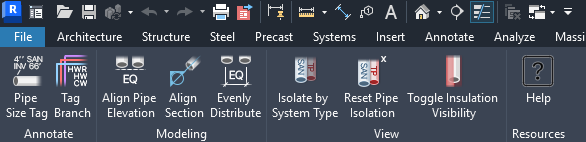
Tools:
 Pipe
Size Tag
Pipe
Size Tag
Adds a pipe size tag above each spot elevation in the current view. You can select a pipe tag type and specify offsets if needed.
 Tag Pipe Bank
Adds size tags for all pipes in a pipe bank above the selected spot elevation. Tags stack vertically in pipe order, using the selected tag type with configurable offsets.
 Align Pipe Elevation
Matches the elevation of multiple pipes to the first selected pipe. Choose between centerline, top, or bottom elevation for alignment.
 Align Section
Aligns the section view to a selected pipe or line, centering it on the object. This lets you quickly modify pipes in the section view.
 Evenly Distribute
Moves selected pipes to maintain equal spacing, keeping the first pipe in place. Define the desired distance between pipes for consistent layout.
 Isolate By System
Type
Isolate By System
Type
Isolates pipe runs based on selected system types. First select reference pipes with the systems you want to isolate.
 Reset Pipe Isolation
Removes system-type isolation, making all pipe runs visible again. Reverses the effect of the 'Isolate by System Type' tool.
 Toggle Insulation
Visibility
Toggle Insulation
Visibility
Switches pipe insulation visibility on/off based on your current view settings.
 Insulation by Size & Type
Applies insulation based on pipe size and system type using user-defined criteria. Includes a detailed report showing the application status for each rule.
 Split Pipe Branch
Split multiple pipes in a branch with a single action using a picked point or reference line. Choose between perpendicular, vertical, horizontal, or custom direction.
Pipe Clearance
Moves selected pipes to maintain the required clearance between pipes, including insulation when present. Define default spacing or apply custom rules.
 Align Branch
Align Branch quickly aligns a branch pipe with the main pipe while preserving its slope, allowing a clean Revit connection without fitting errors.